
Classify and Route Email Cases with AI
AI analyzes inbound emails to classify priority, product area, and sentiment, then routes cases through Salesforce Flow
Emails flood in. Triage falls behind.
Every inbound email needs classification, routing, and a response. Manual triage cannot keep pace with volume, and misrouted cases drive up resolution times across the board.
Of support email volume overwhelms manual triage
Peak hours flood the shared inbox faster than agents can read, classify, and assign. Emails sit unrouted while agents context-switch between triage and active cases, and priority items get buried under routine requests.
“It enables Salesforce professionals like me to leverage AI of my choice in a declarative manner. Case summarization, classification, routing, personalized email response generation.”
- Sury Ramamurthy, Technical Architect, Innolake Corporation
Build prompts with Prompt BuilderEmails misclassified during manual triage
Agents scanning dozens of emails per hour make inconsistent classification decisions. A billing complaint gets tagged as a general inquiry, routes to the wrong queue, and bounces between teams before reaching someone who can actually resolve it.
“Found the deployment to be easy. Just took me 10 minutes. Pre-configured prompts and the complimentary Open AI connection helped me test this App quick.”
- Salman Khan, Release Manager, IBM
Automate with Flow IntegrationAverage first-response time for email cases
Emails wait in queue while agents triage, classify, and route manually. By the time a case reaches the right agent, the customer has already sent a follow-up or escalated through another channel - creating duplicate work and negative CSAT scores.
“Liked the easy and click/no-code way to configure GPT LLMs on any Salesforce object and go-live in days.”
- Gurditta Garg, Chief Salesforce Evangelist, Motorola
Secure this with Security LayerAutomated Email Support Responses
Instant customer support through AI drafts
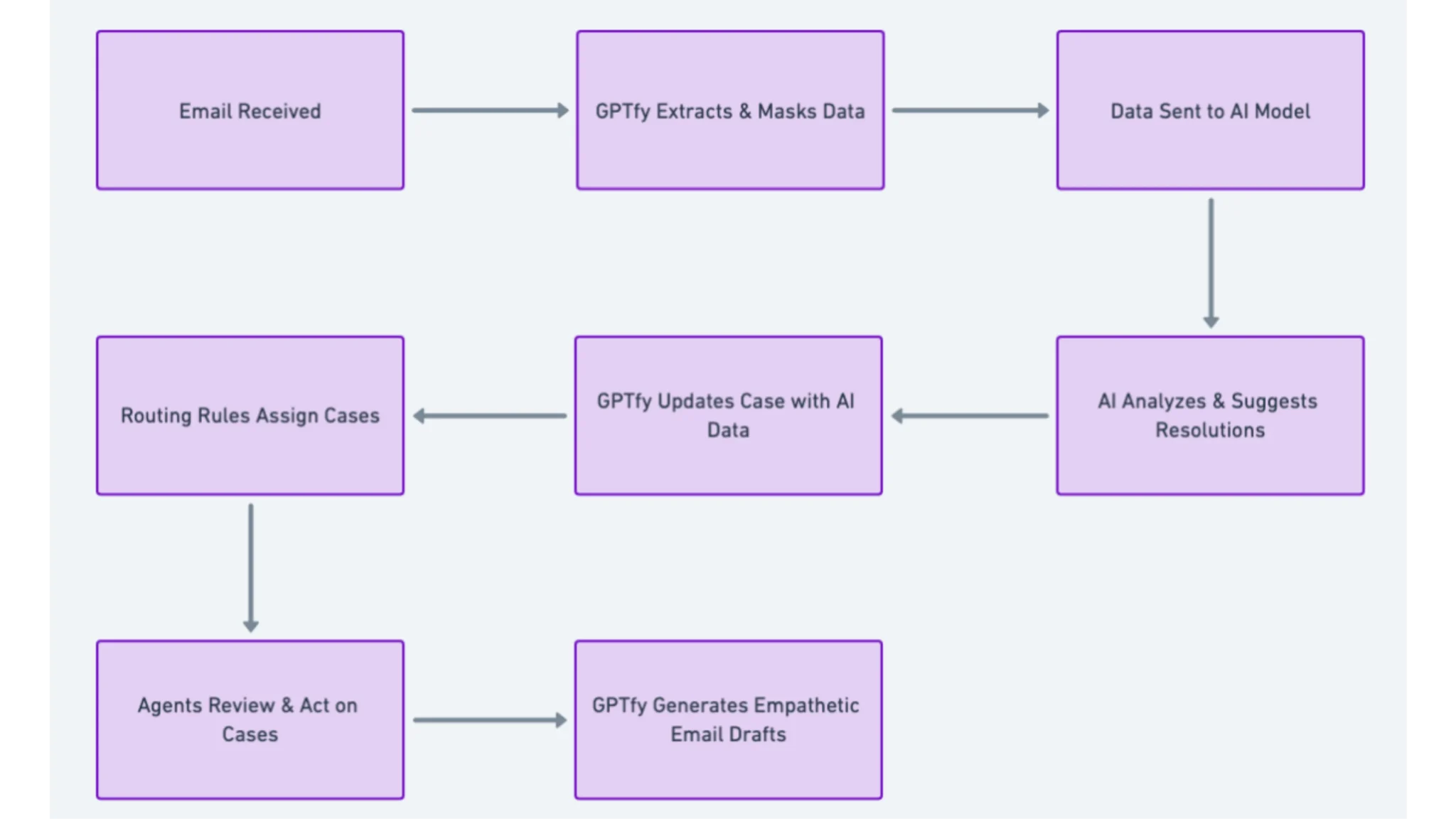
AI analyzes incoming emails and generates personalized response drafts from your knowledge base, ready for agent review and sending. GPTfy reads the email body, subject line, and sender context to produce responses that address the specific issue raised.
Professional responses with intelligent routing via Flow
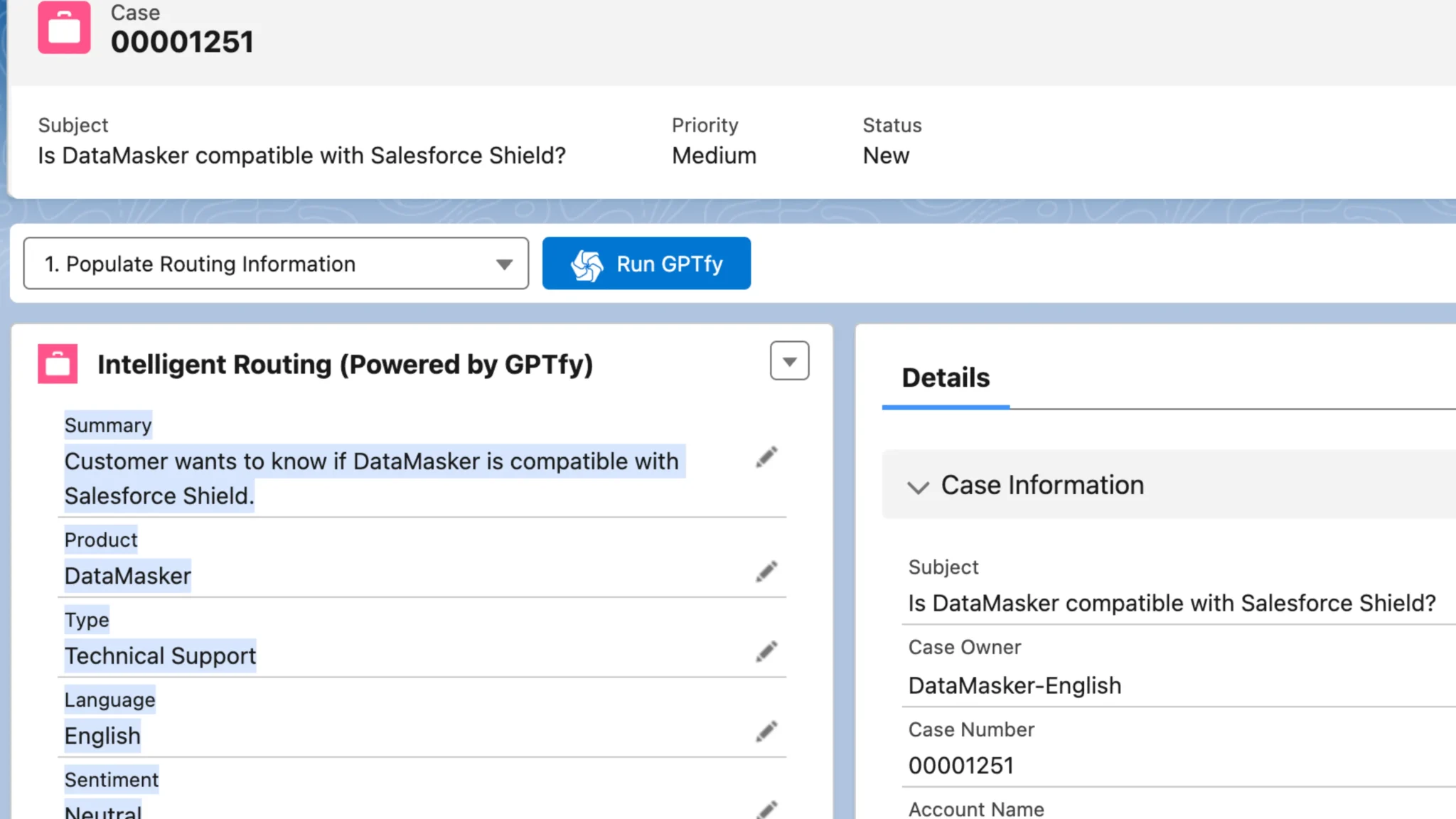
Enhanced subject lines, personalized greetings, and smart routing based on AI content analysis integrated with Salesforce Flow. GPTfy classifies each email by product area, priority, and sentiment, then writes those values to case fields so Flow routes the case to the correct queue automatically.
AI-Powered Email Classification
Intelligent content analysis for faster routing
GPTfy analyzes email content to classify priority, product area, and sentiment, then writes classification results to case fields for automated routing via Flow. The AI reads beyond keywords to understand intent, distinguishing a billing question from a cancellation threat even when both mention 'invoice.'
Consistent case categorization through Prompt Builder
Eliminate manual triage with AI-powered case classification that routes emails to the right team based on content analysis and business rules. GPTfy's Prompt Builder lets admins define classification categories, priority logic, and routing rules without code.
Measurable Business Impact
Improved support metrics with AI classification
Faster response times, consistent quality, and reduced workload for complex issue handling. When emails arrive pre-classified with sentiment, priority, and product area, agents skip the triage step and start resolving immediately, cutting average first-response time.
Production-ready security via PII masking and audit trails
GPTfy's Security Layer masks customer PII before email content reaches any AI model. Every classification and draft response is logged in a Security Audit Record. Output rules enforce brand language and compliance standards on every generated response.
Why Choose Email-to-Case AI Routing
Automated Email Classification
AI reads the email body, subject line, and sender context to classify priority, product area, and sentiment - writing results directly to case fields so Flow routes each case without manual review.
Faster Case Creation
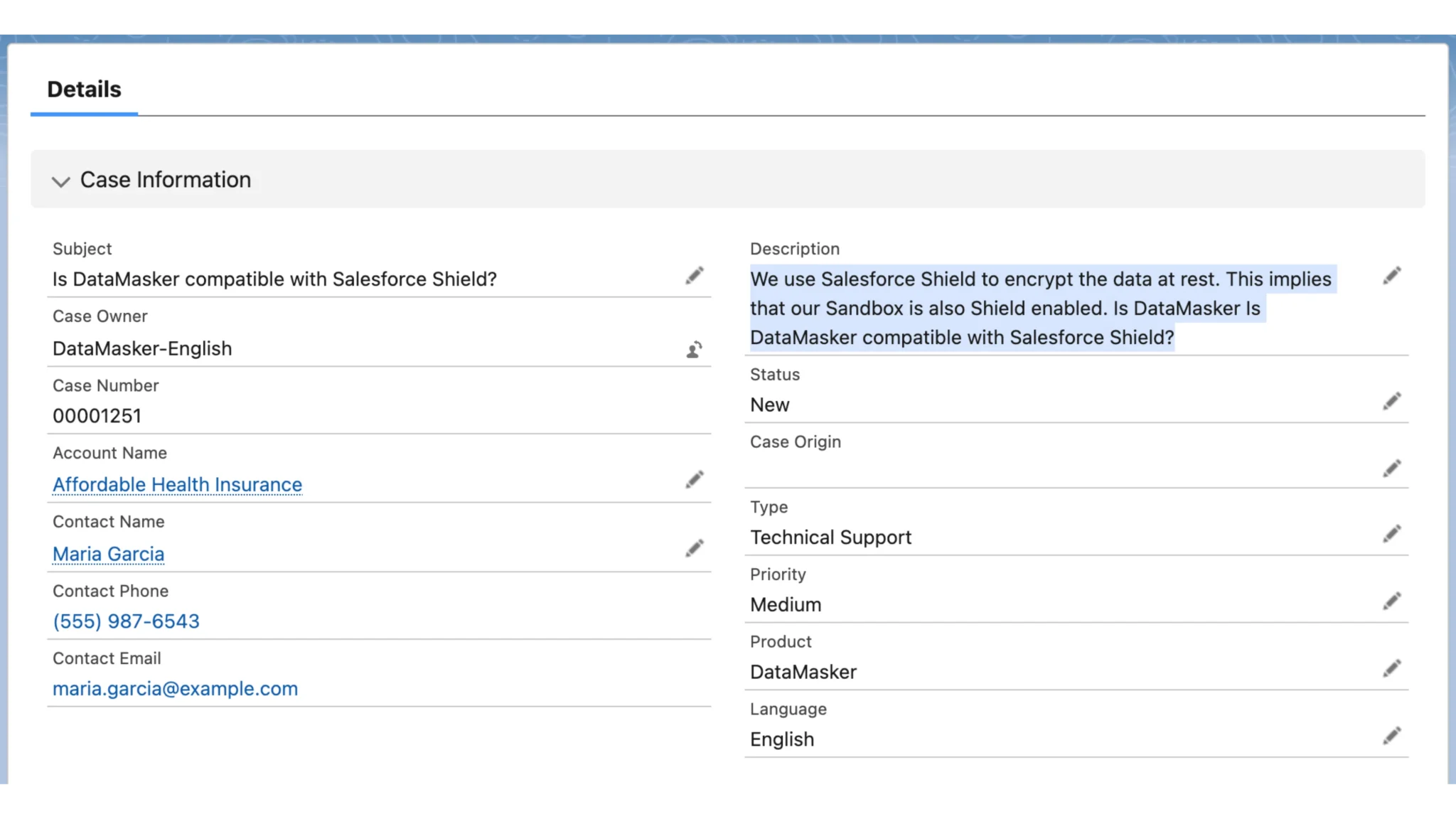
Inbound emails become fully enriched case records in seconds. GPTfy populates subject, description, priority, and category fields automatically, eliminating the manual data entry that slows down every new case.
Reduced Manual Triage
Classification rules defined in Prompt Builder replace the daily triage queue. Agents receive pre-routed cases with context already attached instead of spending their first minutes categorizing and reassigning.
Powerful Capabilities
Intent Detection
GPTfy reads beyond keywords to understand the customer's actual intent - distinguishing a billing question from a cancellation threat even when both emails mention 'invoice.'
Sentiment Scoring
Each inbound email is scored for sentiment and urgency. GPTfy writes the sentiment value to a case field so Flow can fast-track frustrated customers to senior agents automatically.
Auto-Field Population
GPTfy extracts product area, issue type, priority, and language from the email content and writes each value to the corresponding case field - no manual data entry required.
Smart Routing
Classification results feed directly into Salesforce Flow and assignment rules. Cases route to the correct queue based on AI-determined priority, product area, and sentiment without human intervention.
Key Takeaways
- AI reads email body, subject, and sender context to classify priority and product area
- Sentiment scoring routes frustrated customers to senior agents via Salesforce Flow
- GPTfy generates draft responses grounded in knowledge base and product data
- PII masking strips customer data before email content reaches the AI model
- Prompt Builder defines classification categories and routing rules without code
- Handles multi-language email classification for global support operations
Frequently Asked Questions
GPTfy triggers via Salesforce Flow when a new email-to-case record is created. The AI reads the email body and subject, classifies the case, and writes results to case fields. Your existing Flow or assignment rules then route based on those enriched field values.
Yes. GPTfy analyzes the email content and generates a personalized response draft grounded in your knowledge base and product data. Agents review and edit the draft before sending, maintaining quality control while cutting response drafting time.
Yes. The AI detects the email language and can classify and route accordingly. GPTfy writes the detected language to a case field so Flow can route non-English emails to the appropriate language-specific queue.
GPTfy's Security Layer masks customer names, email addresses, phone numbers, and custom-defined sensitive data before email text is sent to any AI model. The classification results and draft responses reference Salesforce records without exposing raw PII.
GPTfy installs as a managed package in minutes. Admins configure a Flow trigger on case creation, set up classification categories in the Prompt Builder, and connect their preferred AI model through Named Credentials. Most support teams have AI-powered email routing live within a single business day.
Yes. GPTfy processes each email as an individual Flow-triggered prompt execution, so classification scales with your case creation volume. Each email is analyzed independently, meaning peak-hour spikes do not create processing queues. The AI typically classifies and enriches a case within seconds of creation.
See AI Email-to-Case Routing Live
30 minutes. Watch GPTfy classify inbound emails, generate draft responses, and route cases automatically in your Salesforce org.
Related Use Cases
Case Intelligent Routing
Route cases to the best-qualified agent using AI analysis.
Case Summarization
Auto-generate concise case summaries from full conversation history.
Knowledge Article Management
Auto-generate and update knowledge articles from resolved cases.
Sentiment Journey
Track customer sentiment across every interaction over time.
AI for Service
All AI-powered service use cases for Salesforce.