
What is Data Masking in Salesforce AI?
Learn how data masking protects PII and PHI before data reaches AI models. Four-layer architecture for Salesforce-native security.
Last updated: February 20, 2026
The Problem Data Masking Solves
Salesforce teams want to use AI for case summarization, email generation, and lead qualification. But standard AI implementations send raw customer data to external providers - creating compliance risks for regulated industries.
Without masking, a service agent might accidentally expose a customer's SSN, DOB, or medical record number when requesting an AI case summary. Once that data leaves your Salesforce org, you lose control over it.
Data masking solves this by hiding or replacing sensitive information before any data leaves Salesforce. The AI still receives the context it needs to analyze, classify, or summarize - but without the sensitive identifiers.
What is Data Masking?
Data masking is the process of hiding or replacing sensitive information before AI systems process it. Common masking techniques include:
- Redaction: Replacing sensitive data with asterisks (***-**-****)
- Tokenization: Substituting real values with reversible tokens ([NAME-001])
- Semantic masking: Preserving analytical properties while hiding actual values (e.g., shifting dates but keeping age brackets accurate)
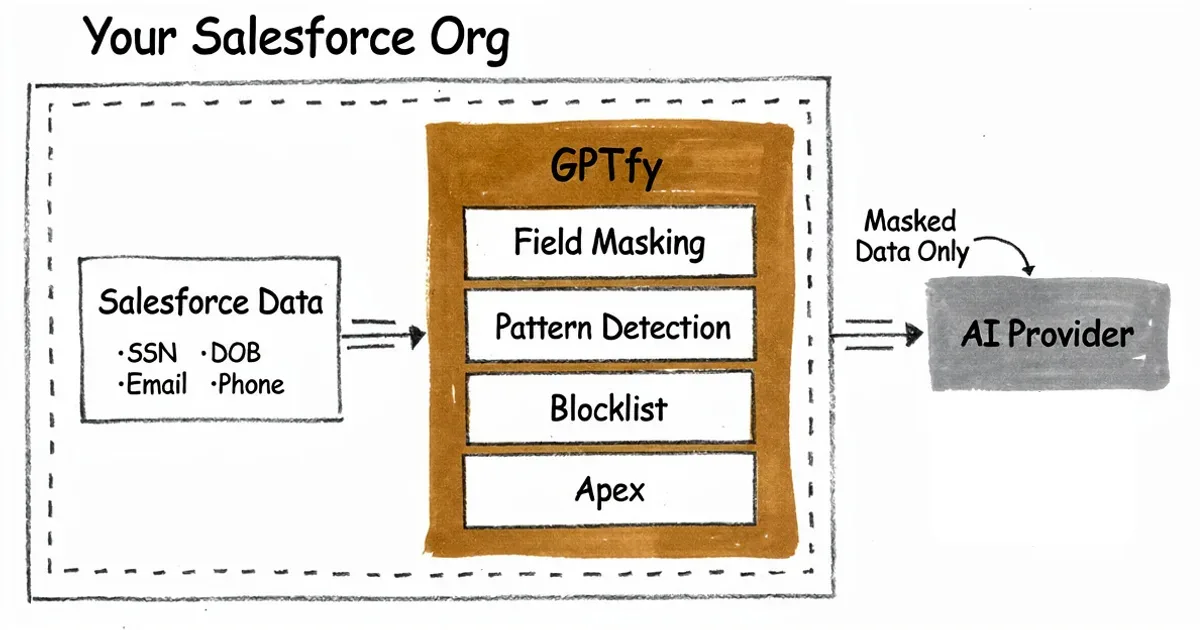
In Salesforce AI contexts, masking ensures personally identifiable information (PII) and protected health information (PHI) never reach external LLMs - while still allowing AI to analyze sentiment, classify cases, and generate insights. GPTfy's security layer builds masking directly into every AI callout, with no separate configuration required per prompt or workflow.
GPTfy's Four-Layer Masking Architecture
GPTfy implements defense-in-depth with four independent masking layers. Each layer catches different types of sensitive data, ensuring comprehensive protection. The zero-trust architecture that governs data residency depends on these four layers running in sequence before any callout exits your Salesforce org.
Layer 1: Field-Level Masking
GPTfy masks complete field values based on field mapping. When a field is designated for masking, its entire contents replace with tokens before reaching AI. Best for email addresses, phone numbers, names, and account numbers.
Layer 2: Pattern-Based Detection
GPTfy uses regular expressions to detect sensitive patterns within long text fields. Pre-built patterns recognize SSNs (XXX-XX-XXXX), credit cards, phone numbers, and email addresses. Best for case comments, emails, and notes where sensitive data might appear inline.
Layer 3: Blocklist-Based Masking
Org-wide blocklists of sensitive terms that should never reach AI apply automatically. Include project codenames, competitor names, confidential IDs, and custom terms you define. Best for unstructured text containing organization-specific sensitive terms.
Layer 4: Apex-Based Enforcement
Custom Apex logic executes for complex masking requirements. This enables semantic masking that preserves analytical properties - such as shifting dates while keeping age brackets accurate. Best for specialized compliance requirements that go beyond standard patterns.
What Data Can Be Masked?
GPTfy supports masking for a comprehensive range of sensitive data types across standard Salesforce fields and custom objects.
PII (Personally Identifiable): Social Security Numbers, Dates of Birth, Credit/Debit Card Numbers, Bank Account Numbers, Email Addresses, Phone Numbers, IP Addresses, Driver's License Numbers.
PHI (Health Information): Medical Record Numbers, Health Plan IDs, Certificate/License Numbers, Vehicle Identifiers, Device Identifiers, Web URLs. For healthcare organizations building AI workflows on Salesforce Health Cloud, this PHI coverage is the critical requirement that determines compliance eligibility.
HIPAA Note: GPTfy masks 16 of 18 HIPAA PHI identifiers. Biometric identifiers and full-face photographs have limited support. For complete HIPAA compliance, consult your compliance officer regarding your specific use case.
For financial services organizations under FINRA, SEC, or OCC oversight, the PII coverage - especially SSN, account numbers, and credit card data - maps directly to the data protection requirements in those regulatory frameworks.
Real-World Example
Here is how GPTfy's four layers work together in practice:
Original user input: "Summarize this case for patient John Smith, SSN 123-45-6789, DOB 03/15/1980. His email is john.smith@email.com and he called from 555-123-4567 about Project XRAY claim denied."
After GPTfy masking: "Summarize this case for patient [NAME-001], SSN ***-**-****, DOB [DOB-002]. His email is [EMAIL-003] and he called from [PHONE-004] about [BLOCKED] claim denied."
Layers applied: Layer 1 (Name field), Layer 2 (SSN, DOB, Email, Phone patterns), Layer 3 (Project XRAY blocklist). The AI can still analyze case sentiment and context, but no sensitive data reaches the external provider.
Does Masking Affect AI Accuracy?
For most AI tasks, masking has no impact on accuracy. AI can analyze sentiment, classify cases, generate summaries, and identify trends without seeing actual personal identifiers.
When analytical context is needed, GPTfy's semantic masking (Layer 4) preserves the meaning while hiding values. For example, an AI analyzing age demographics doesn't need exact birth dates - knowing someone is in the "40-49 age bracket" is sufficient for most analyses.
For RAG workflows that retrieve documents before generating responses, masking applies to both the retrieved context and the user query - ensuring neither path exposes PII to the AI provider. For technical implementation details, see the Data Masking feature page.
How Data Masking and Named Credentials Work Together
Data masking and Named Credentials for AI authentication are two complementary security controls - one governs what data reaches the AI provider, the other governs how the request authenticates with that provider.
When GPTfy executes an AI callout, the sequence is: mask the data (four layers), then authenticate using the Named Credential (server-side injection). The AI provider receives masked content through an authenticated, encrypted channel. Neither the credential value nor the raw PII ever travels outside your Salesforce org.
For teams configuring a BYOM (Bring Your Own Model) setup, this combination is what makes enterprise-grade AI deployments possible in regulated industries. You choose the model, GPTfy handles the data governance.
The audit trail system captures every AI callout - masked prompt, model used, user context, and timestamp - giving compliance teams the evidence chain they need for GDPR, HIPAA, and SOX audits.
Automated Masking for Agentic AI at Scale
As organizations deploy agentic AI workflows - workflows that autonomously retrieve, process, and act on Salesforce data - the volume of AI-processed information scales rapidly. A single agentic workflow can trigger dozens of AI callouts per session, each touching customer records, case histories, and account data.
Manual data governance doesn't work at that volume. GPTfy's four-layer masking runs automatically on every AI callout, so as agentic workflows expand across more users and more data, PII and PHI protection scales with them. There is no configuration gap to close as new agents are deployed - the masking architecture applies uniformly.
This is what makes it safe to give AI agents broad access to Salesforce records without creating compliance exposure. Agents can retrieve case details, account histories, and contact records autonomously - because every callout is masked before it leaves the org. For GDPR and HIPAA compliance, this automated, per-callout masking is the architecture that satisfies data minimization requirements even at agentic scale. See Data Masking for the full four-layer architecture, or watch the security architecture demo to see these controls in action.
Getting Started with Data Masking
GPTfy's masking layers 1-3 require zero coding. Administrators configure masking through point-and-click interfaces:
- Navigate to Data Context Mapping in the GPTfy Cockpit
- Select the Salesforce object (Account, Contact, Case, etc.)
- Choose fields to mask and select masking layer (Entire Value for Layer 1, Specific Patterns for Layers 2-3)
- Save and activate - masking applies immediately to all AI prompts
For advanced scenarios requiring Apex (Layer 4), implement the GPTfy processing interface to apply custom masking logic. The SPEC Security datasheet documents the full compliance scope - which frameworks GPTfy's masking architecture supports and which specific controls each layer satisfies.
Key takeaways
Data masking hides sensitive data
PII and PHI are masked before reaching AI models, ensuring compliance while preserving AI utility.
Four-layer defense in depth
Field-level, pattern-based, blocklist, and Apex layers work together for comprehensive protection.
16 of 18 HIPAA identifiers supported
Covers SSN, DOB, medical record numbers, and more for healthcare compliance scenarios.
Zero code for layers 1-3
Point-and-click configuration in GPTfy's Data Context Mapping - no Apex required for standard masking.
Data stays in your org
Raw data never leaves Salesforce; only masked tokens reach external AI providers.
FAQ
Data masking in Salesforce AI is the process of hiding or replacing sensitive information - such as PII, PHI, and financial data - before it is sent to AI models. GPTfy applies four layers of masking (field-level, pattern-based, blocklist, and Apex) inside Salesforce, ensuring only masked data reaches external LLMs.
Usually no. Most AI tasks - sentiment analysis, case classification, email summarization - work perfectly with masked data. When context matters, GPTfy's semantic masking (Layer 4) preserves analytical properties while hiding actual values.
GPTfy can mask SSN, DOB, credit card numbers, bank account numbers, email addresses, phone numbers, IP addresses, medical record numbers, driver's license numbers, and custom patterns. For HIPAA, 16 of 18 PHI identifiers are supported.
HIPAA requires that Protected Health Information (PHI) be protected when used with third-party systems. Data masking helps meet this requirement by ensuring PHI is anonymized before reaching external AI providers.
No. Layers 1-3 (field-level masking, pattern detection, blocklists) are point-and-click configuration in GPTfy. Layer 4 (Apex enforcement) is optional for custom requirements that need semantic masking or encryption logic.
Layer 2 (pattern-based detection) catches it automatically. If a user types 'Customer SSN is 123-45-6789' in a notes field, GPTfy detects the SSN pattern and masks it to 'Customer SSN is ***-**-****' before sending to AI.
Raw data stays in Salesforce. Only masked data reaches your AI provider. GPTfy is a Salesforce-native managed package - masking happens inside your Salesforce org before any data leaves. Your AI provider only receives masked tokens.
Two layers of protection apply. First, you can configure zero data retention with your AI provider so prompts are not stored. Second, even if data was retained, GPTfy's masking ensures what was sent contained only masked tokens - no raw PII. The mapping table lives in your Salesforce org, not with the AI provider.
Agentic AI workflows process far more data than human-triggered interactions - potentially hundreds of callouts per session across accounts, cases, and contacts. GPTfy's four-layer masking applies automatically to every callout, so compliance protection scales with agentic volume without any additional configuration. Organizations can grant agents broad Salesforce record access knowing PII and PHI are masked before every callout leaves the org.
See data masking in action
Book a demo and we'll walk through the four-layer masking architecture, showing how PII and PHI stay protected while enabling AI capabilities.
Explore More
Data Masking
Four layers of protection: field-level, pattern-based, blocklists, and Apex enforcement.
Zero-Trust Architecture
How GPTfy keeps raw data inside Salesforce with admin-controlled AI callouts.
Bring Your Own Model
Configure external models in GPTfy with full masking and governance controls.
Audit Trails & Governance
Complete audit logs for every AI interaction - required for GDPR, HIPAA, and SOX compliance.
Security & Compliance
GPTfy's full zero-trust security architecture for Salesforce AI.
Security Architecture Demo
Watch how GPTfy's zero-trust security layer protects AI data flows
Named Credentials for AI Security
How GPTfy secures AI API authentication with Salesforce Named Credentials
SPEC Security Datasheet
Security, privacy, ethics, and compliance documentation for GPTfy
BYOM in Salesforce
How to connect any AI model to Salesforce through GPTfy