
Track AI Savings Per User
Monitor dollars saved, time recovered, and adoption rates across every prompt and department inside your Salesforce org with GPTfy's built-in ROI dashboard
You invested in AI. Can you prove it works?
AI budgets are growing, but most teams cannot show what they got for the money. Without usage data tied to business outcomes, every renewal is a leap of faith.
Cannot prove AI ROI to their board
AI tools are deployed, but finance asks for dollar impact and the team has nothing concrete. Adoption feels strong anecdotally, yet no one can tie prompt usage to hours saved or revenue influenced.
“It takes them 8 minutes to enter an order. With this, it now takes 2. It's time saved. I think that's where the ROI is in my head.”
- Technical Architect, Fortune 500 Manufacturing
Build prompts with Prompt BuilderSpent on AI tokens with zero cost visibility
API invoices arrive as a single line item. Nobody knows which teams, prompts, or models drive the spend. When budgets tighten, AI is the first line item cut because there is no data to defend it.
“Really nice App. It does what it claims. Pre-packaged prompts make it easy to use.”
- Shailesh Varshney, Developer, Capgemini Australia
Connect your model via Bring Your Own ModelMeans no way to scale what works
One team saves 30 hours a week with AI and another barely logs in. Without adoption metrics, operations cannot identify the gap, replicate the winning workflow, or provide targeted training where it matters.
“Liked the easy and click/no-code way to configure GPT LLMs on any Salesforce object and go-live in days.”
- Gurditta Garg, Chief Salesforce Evangelist, Motorola
Secure this with Security LayerTrack Savings Per Prompt
ROI Dashboard calculates dollars saved through configurable hourly rates
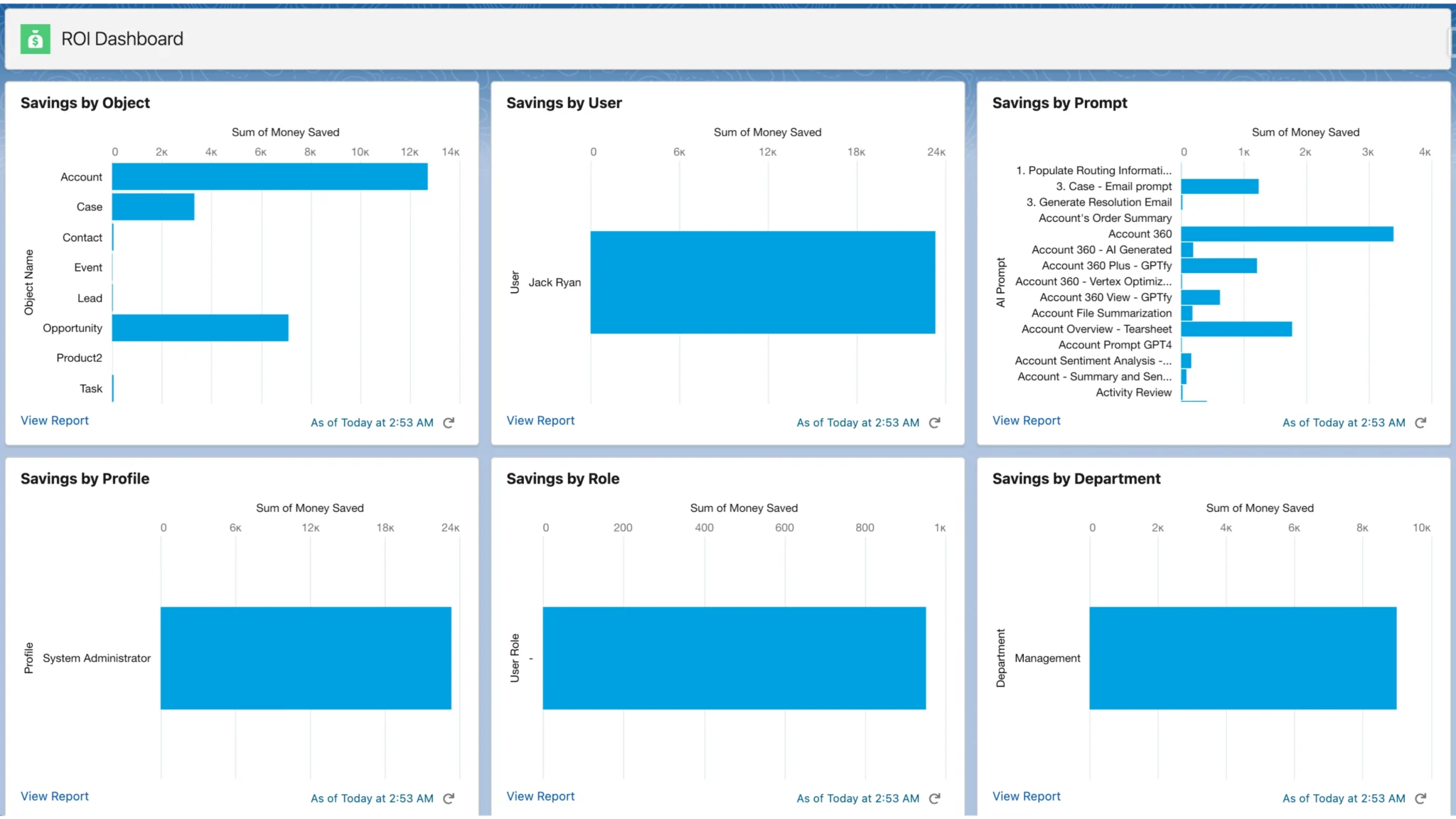
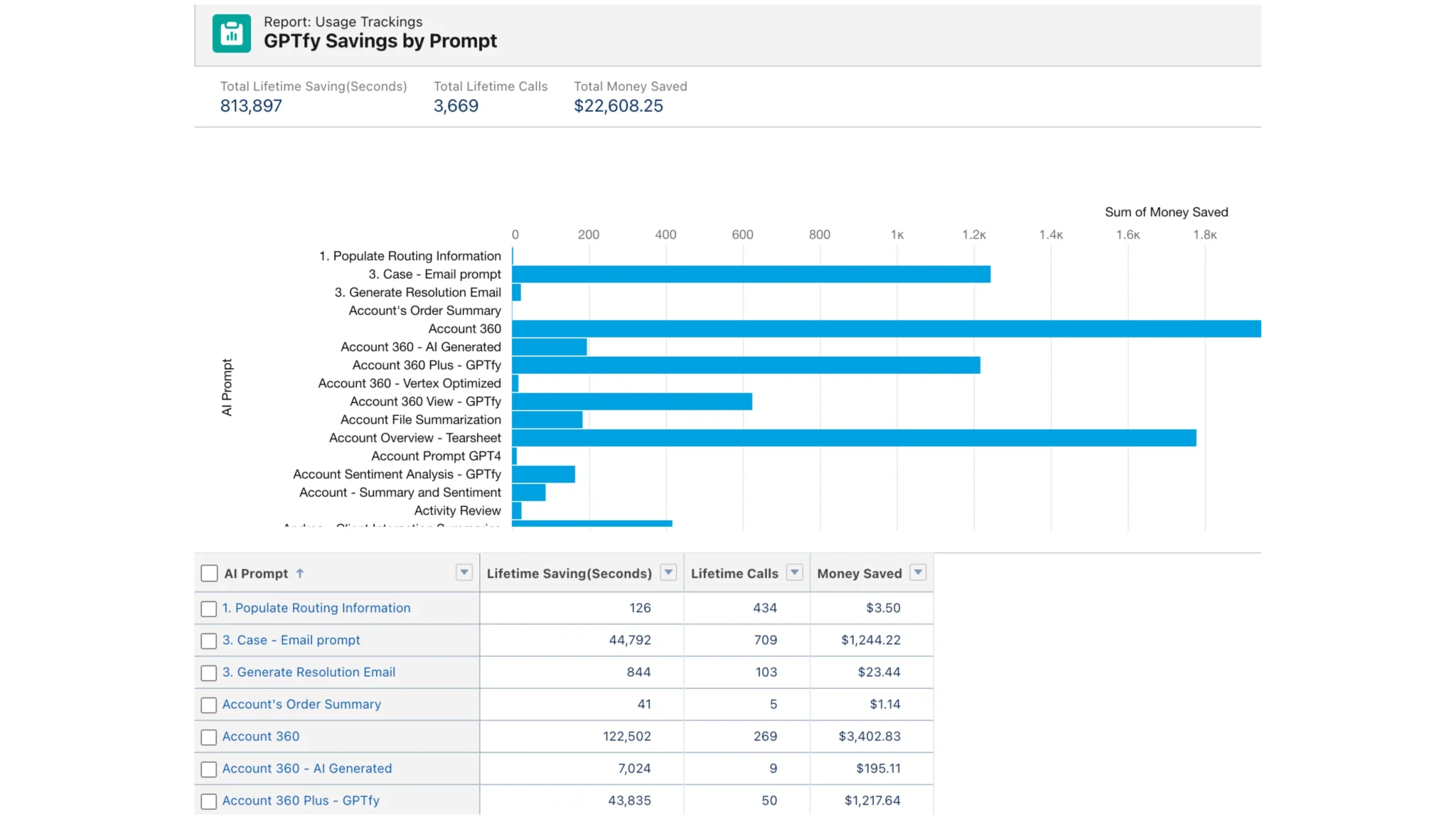
GPTfy's ROI Dashboard calculates dollars saved per user, per prompt, and per department using configurable hourly rates. Every AI execution is logged with a time-saved estimate, and the dashboard aggregates these into real-time financial totals that update as your team works throughout the day.
Generate executive-ready financial reports with actual usage data
Export savings data broken down by team, prompt type, and time period for CFO presentations and budget justification. The dashboard provides the concrete, auditable numbers that procurement teams need to approve renewals and expansion. Not vague ROI estimates, but actual logged usage data.
Understand AI Adoption Patterns
Insights Dashboard reveals usage trends by team and prompt
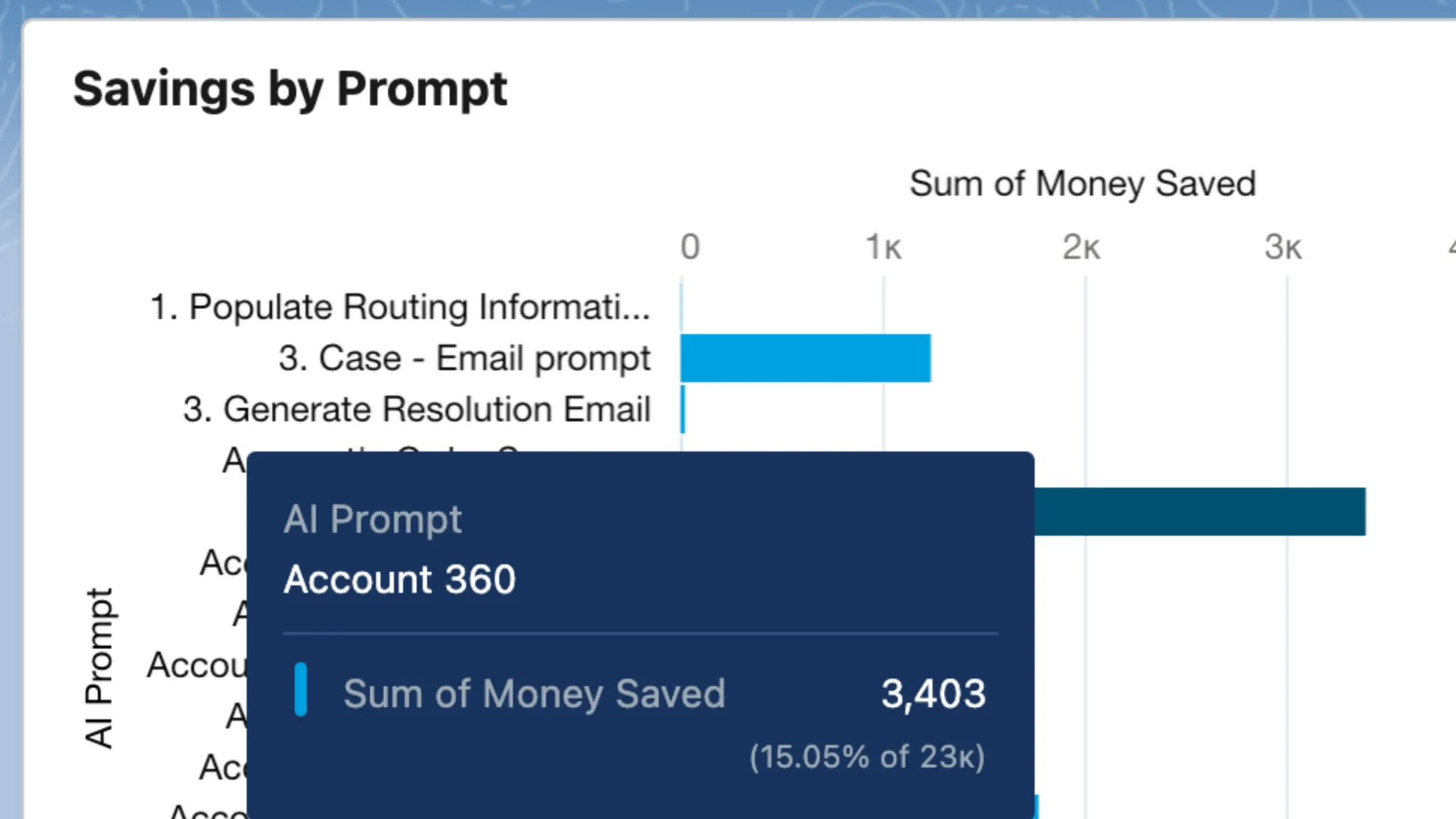
See total time saved, user patterns, and most valuable prompts across your organization. The dashboard surfaces which teams adopt AI fastest, which prompts deliver the most value, and where usage drops off, giving operations teams the data they need to drive adoption.
Identify power users and replicate success via adoption analytics
Replicate successful adoption patterns and provide targeted training for underperforming departments. When one team saves 40 hours per week with a specific prompt, the dashboard makes that visible so you can roll the same workflow to other teams.
Monitor AI Output Quality
Quality insights track satisfaction by prompt and department
View user feedback ratings by prompt, department, and role to optimize AI outputs. The dashboard correlates quality scores with usage patterns so you can identify which prompts need refinement and which consistently deliver high-value results to end users.
Response time analytics included with every prompt execution
Identify performance bottlenecks and set realistic expectations for prompt execution speeds. Track response times across different AI models and prompt types so operations teams can optimize model selection for cost, speed, and output quality.
Why Choose ROI Dashboard
Measurable AI ROI
Every prompt execution logs time saved and dollars recovered. The dashboard aggregates real usage data into financial totals. No estimates, just auditable numbers for budget justification.
Executive-Ready Reporting
Export savings breakdowns by team, prompt type, and time period for CFO presentations. Procurement teams get the concrete data they need to approve renewals and expansion.
Usage-Based Optimization
Identify which prompts deliver the most value, which teams adopt fastest, and where usage drops off. Replicate successful patterns across departments with data-driven decisions.
Powerful Capabilities
Token Usage Tracking
Monitor token consumption per user, prompt, and model in real time. Set usage thresholds and get alerts before costs exceed budgets.
Cost-Per-Prompt Analytics
See exactly what each AI execution costs across different models. Compare OpenAI, Claude, and Azure pricing on the same prompts to optimize spend.
Adoption Metrics
Track active users, execution frequency, and department-level engagement. Surface power users and identify teams that need targeted training.
Model Comparison
Benchmark response quality, speed, and cost across every connected AI model. Make data-driven decisions about which model handles which use case.
Key Takeaways
- ROI Dashboard calculates dollars saved per user, prompt, and department automatically
- Configurable hourly rates convert time-saved estimates into auditable financial totals
- Tracks token consumption and cost-per-prompt across every connected AI model
- Adoption metrics surface power users and identify teams needing targeted training
- Export savings data by team, prompt type, and period for executive presentations
Frequently Asked Questions
Each prompt in the Prompt Catalog includes a configurable time-saved estimate (e.g., 8 minutes for an account summary). Every execution logs this value against the user and department. The ROI Dashboard multiplies time saved by configurable hourly rates to produce dollar savings.
Yes. The dashboard provides exportable reports broken down by team, prompt type, and time period. These reports include actual logged usage data, not estimates, making them suitable for CFO presentations, budget justification, and renewal approvals.
Yes. The ROI Dashboard tracks every prompt execution regardless of which AI model handles it. Whether prompts route to OpenAI, Anthropic Claude, or Azure OpenAI through AI Connection, all usage and savings data appears in the same unified dashboard.
The dashboard ranks prompts by total time saved, execution frequency, and user satisfaction ratings. You can filter by department, role, and time period to find which prompts drive the highest adoption and savings across your organization.
No. The ROI Dashboard is built into the GPTfy managed package and starts collecting usage data automatically from the first prompt execution. Time-saved estimates are configurable per prompt in the Prompt Catalog, and hourly rates for dollar savings calculations can be set by department or role.
Yes. The dashboard supports filtering by department, user role, team, and prompt type. Enterprise organizations can generate separate savings reports for each business unit while maintaining a consolidated org-wide view for executive reporting and budget justification.
See the ROI Dashboard on Your Data
Book a demo to see how GPTfy's ROI Dashboard tracks AI savings, adoption, and quality metrics inside Salesforce.
Related Use Cases
Account 360
Comprehensive AI-powered customer insights across all touchpoints.
Whitespace Analysis
Identify upsell and cross-sell opportunities across your book of business.
Customer Retention
Predict churn risk and automate renewal workflows with AI.
Deal Coach
AI coaching to help reps craft winning sales strategies.
AI for Sales
All AI-powered sales use cases for Salesforce.